You may have encountered a piercing squeal that continues through the speakers in a karaoke room.
Here are several ways to prevent it.
What to Try When Karaoke Feedback Starts
That unpleasant squeal is acoustic feedback. The microphone picks up sound from the speaker, sends it back through the speaker, and captures it again, creating a loop.
The key is to keep the microphone from picking up the speaker output.
Try the following steps in order.
Do Not Point the Microphone at a Speaker
Keep the microphone pointed away from the speakers.
Aiming it directly at a speaker, as shown here, can immediately create extremely loud feedback.
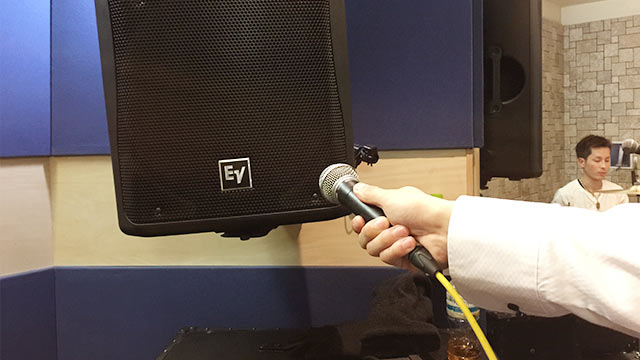
Even if you do not deliberately point the microphone at one, a speaker may be behind your seat. If possible, sit somewhere that does not place a speaker directly behind you.
Lower the Microphone Volume
Even when the microphone is not aimed at a speaker, speaker output can still enter it and begin the loop.
Lower the microphone volume. A louder microphone is more likely to pick up the speakers, so this adjustment alone may solve the problem.
Do Not Cover the Microphone Grille
Covering the microphone head may be the most common cause of feedback at karaoke.
The grip shown here can trigger feedback almost as quickly as pointing the microphone at a speaker.
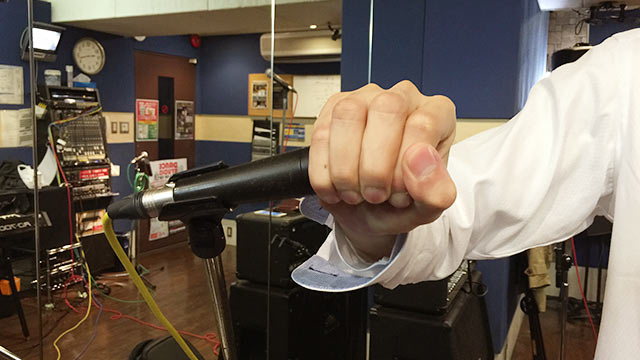
As long as you hold it this way, feedback can occur even at low volume and away from the speaker.
Professional singers avoid covering the grille because it changes the microphone’s behavior and increases feedback risk.
Keep your hand away from the grille and hold the microphone by its body.
Conclusion
If you hear a piercing squeal at karaoke, check these three points.
In my experience, the way someone holds the microphone is usually the cause.